


McAfee Security: Antivirus VPN
4.754.21K Reviews
App Specs
- Version
- 10.8.0.800
- Updated On
- License
- Free
- Downloads
- 50,000,000+
- Developer
- McAfee LLC
- Categories
- Tools
- Platform
- Android, iOS
Screenshots


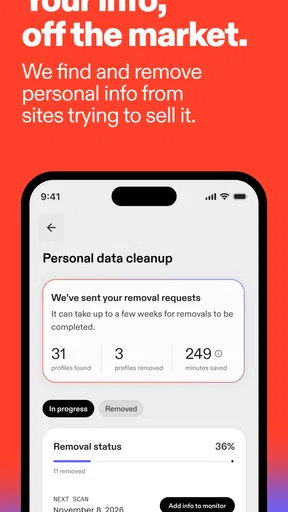
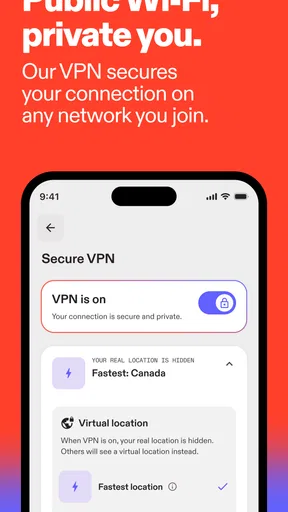
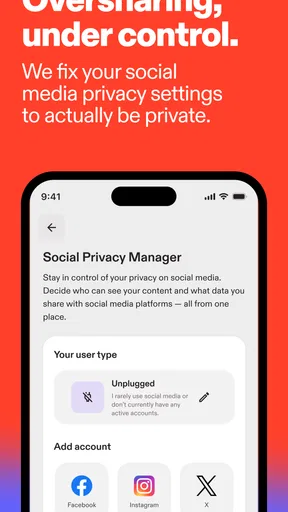
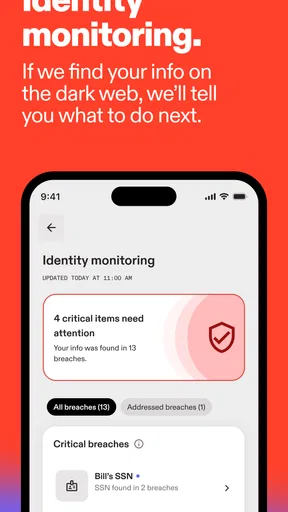

 Analysis by AppCompare
When I try a phone security app, I want it to make everyday decisions easier, not turn routine browsing into a technical project. That is the lens I bring to McAfee Security: Antivirus VPN: I look at how its scanner, VPN and browsing protections fit together, and where a user might need to pause and check a setting before assuming something is wrong. It is a free tools app from McAfee LLC, with optional in-app purchases ranging from $0.99 to $200.00 per item. That makes it accessible to try, but it is still worth understanding which protections you actually plan to use before spending anything.
Where users can get stuck
The first hurdle with a security app is often not a dramatic malware alert; it is knowing what a screen or notification is asking you to do. A scan result, a warning about a website and a VPN status each describe different things. I would treat them as separate signals rather than assuming that one green status means every part of the phone is protected. If a warning appears while I am opening a familiar page, I would stop long enough to check the address and the context instead of tapping through simply to clear the alert.
Another point of friction is that security tools can make ordinary changes feel urgent. A notification may be useful, but repeated prompts can distract from the task at hand. I prefer to read the message, decide whether it concerns the current activity, and then review notification settings if the interruptions become excessive. Turning everything off for convenience is not a great workaround: it can also hide the one alert I would have wanted to see.
Setup checks that save time later
After installation, I would open each main area once and check that I understand what its status means. Run the device scan, look at the VPN section separately, and try the secure browsing tools in the sort of browsing session where you expect to use them. This small check helps distinguish an unfinished setup step from a genuine problem. It also makes it easier to recognize the normal screen later, when you are in a hurry.
The app is rated for Everyone, and its current version is 10.1.0.771; it requires Android 11 or later. Those details matter before you troubleshoot: if the phone is running an older system, repeated attempts to install or update are unlikely to fix the compatibility issue. I would check the operating system first, then make sure the app itself is current, before changing several settings at once. Changing one thing at a time makes it much easier to spot what helped.
It is also useful to decide in advance whether you want the VPN active for a particular browsing session. A VPN is not the same as an antivirus scan, and switching one on does not answer every security question about a file, a website or an account. On public Wi-Fi, I would check that the VPN is actually shown as active before relying on it. If the connection behaves differently with it enabled, compare the same ordinary task with it off and on; that gives you a clearer clue than repeatedly restarting the phone.
Recovering a normal workflow
If a scan, page warning or network connection seems stuck, I would work through the simplest checks first: return to the relevant screen, read the status, and retry the task once. If the issue concerns browsing, test another familiar page rather than repeatedly refreshing the one that triggered the warning. If it concerns Wi-Fi, confirm that the phone itself is connected before treating the security app as the source of the trouble. These steps do not bypass protection; they help identify which part of the chain needs attention.
Worth Reading Before You Choose

Flipboard Shows What News Apps Must Do Beyond the Feed

Switching to Android Auto Means Rethinking Your Driving Routine

Google Calendar Makes a Crowded Week Easier to Manage

Ludo King Makes the Most of the Minutes Between Plans

Baby Panda World Brings Quick Play to Modern Phones, but Its Game Library Feels Busy

ESPN’s Live Game View Makes Following Close Games Easier
For a suspicious file, the sensible move is not to restore or reopen it just to see what happens. I would follow the app’s displayed guidance and avoid treating a warning as proof that a file is harmless merely because it came from a familiar conversation. The same caution applies to links: a message can look routine while its destination is not. McAfee’s scanning and risky-site warnings are most useful when I let them interrupt a questionable action rather than dismissing them automatically.
A practical routine is to scan when something has changed or seems unusual, rather than repeatedly checking the same screen for reassurance. For example, after installing an app from a source I am unsure about, I would use the scanner and review any result before continuing. If the phone is behaving normally and the app reports no issue, endless rescanning is unlikely to make the decision clearer. The goal is a usable safety habit, not a new source of anxiety.
When the app may not be the cause
Security software can coincide with a slow page or a failed connection without causing it. A weak Wi-Fi signal, a service outage or a problem with the page itself can look similar at first. I would compare more than one website and, if practical, another network before blaming the VPN or secure browsing. If only one site fails, the site or its connection may be the issue; if everything is affected, checking the phone’s connection is a more useful first step.
Battery drain deserves the same careful approach. The app includes a battery optimizer, but I would not assume that every drop in battery life comes from security scanning or background activity. Look at what else has changed in your routine and avoid closing or disabling protections blindly. An optimizer can be convenient, yet aggressive changes to background behavior may also affect apps you rely on. I would use it selectively and check whether the specific problem improves.
McAfee Security has a 4.8 average from around 873,000 ratings and more than 50 million installs. That level of adoption makes it a familiar option, but popularity cannot tell me whether its mix of tools suits my own phone. The app has been available since May 30, 2011, and it is still important to judge it by the current experience rather than by longevity alone.
First Impressions
Right off the bat, the app impressed me with its sleek and user-friendly interface. The installation process was a breeze, taking just a couple of minutes. Once up and running, it gave me a reassuring nod with a quick scan of my device, ensuring that everything was shipshape. I mean, who doesn’t like a bit of peace of mind?
Features Galore
Now, let’s talk about the features. This app is packed with tools designed to keep your device secure. It’s like having a Swiss Army knife for digital protection. The antivirus scanner is the star of the show, constantly running in the background to detect and neutralize threats. During my tests, it flagged a couple of suspicious files that were then swiftly dealt with.
Then there’s the VPN feature, which I found particularly handy. It allows you to browse the internet securely, protecting your data from prying eyes. I tested it during a coffee shop session and felt much safer using public Wi-Fi.
Performance and Usability
If you’re worried about the app slowing down your device, breathe easy. I didn’t notice any significant lag or performance issues. The app runs quietly in the background without being a resource hog, which is crucial for those of us who are always on the go.
Navigating through the app is intuitive. The dashboard is well-organized, with clear sections for scanning, VPN, and other features. Even if you’re not tech-savvy, you’ll feel right at home.
One everyday use case where that layout helps is a quick check before handling something sensitive on the move. If I am about to sign in while waiting at a café, I can look at the VPN status and decide whether I want that extra connection layer for the session. If the VPN is not active, I should not assume it is protecting the traffic simply because the feature is present in the app. That simple status check is more useful than turning the tool on once and forgetting how it behaves.
This combination is best suited to someone who wants a familiar security dashboard and prefers having scanning, safer browsing and a VPN in one place. It may be less appealing if you already have a security suite you trust, or if you only want a lightweight tool for one narrow task. In that case, using overlapping security apps can add more notifications and settings to manage without making your routine meaningfully safer.
Extra Perks
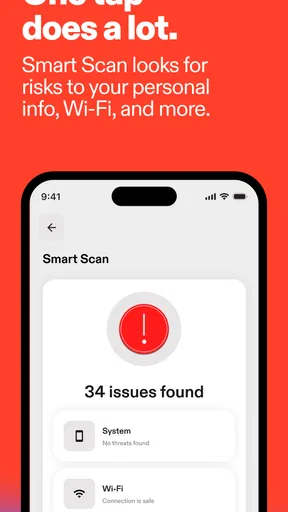
Besides the core features, McAfee Security: Antivirus VPN offers some neat extras. There’s a secure browsing feature that warns you about risky websites and a Wi-Fi scanner that checks the safety of your network. These additional layers of protection make it a comprehensive security solution.
One particular feature I appreciated was the battery optimizer. It helps manage background apps to extend battery life, which is a nice touch considering security apps are often notorious for draining power.
A useful way to think about the Wi-Fi scanner is as a check on the network you are joining, not a substitute for sensible behavior on that network. I would use it when connecting somewhere unfamiliar, then still avoid entering sensitive details on a page that looks suspicious. The secure browsing warning serves a different purpose: it can help me pause before visiting a risky destination. Neither tool removes the need to check what I am opening, but together they give me more than one moment to reconsider.
Compared with relying only on a phone’s built-in protections, McAfee brings several security tasks into a single app, which can make them easier to find. The trade-off is another dashboard, another set of alerts and, potentially, paid options to weigh. Someone who wants only basic device safeguards may be happier with the protections already built into their phone and careful browsing habits. Someone who likes having a scanner and network tools together may find the extra visibility worthwhile.
Room for Improvement
While the app is quite comprehensive, there's always room for improvement. For instance, the VPN could offer more server locations for those seeking a wider range of browsing options. Additionally, some might find the occasional notifications a bit too frequent, though they can be customized in settings.
The most important trade-off for me is convenience versus control. An all-in-one security app is easier to manage than several separate tools, but it may not provide the specialized choices a frequent VPN user expects. If your priority is choosing from a broad range of VPN locations, a dedicated VPN service may be a better fit. If your priority is a single place to check device scanning and browsing protections, the bundled approach is more practical.
It is free to download, but the presence of in-app purchases means I would review any offer carefully before agreeing to it. A prompt to upgrade is not the same as a requirement to pay for every basic check, and I would avoid making a purchase simply because a warning has made me feel rushed. First work out what feature you need, then decide whether the price shown for that option makes sense for your use. This is especially relevant for anyone who only wants occasional scans and does not need a paid add-on.
Final Thoughts
So, is McAfee Security: Antivirus VPN worth it? In my book, yes. It offers a solid suite of tools to safeguard your device without compromising performance. Whether you’re worried about malware, phishing, or unsecured Wi-Fi, this app has your back.
If you’re in the market for a reliable security app, give it a whirl. You might just find it’s the peace of mind you didn’t know you needed. Stay safe out there!
I would recommend it most to Android users who want scanning, risky-site warnings and a VPN gathered in one place, and who are willing to check what each tool is doing instead of treating the app as an automatic guarantee. I would skip it if I already had a preferred security setup, wanted a VPN primarily for broader location choice, or found extra security notifications more distracting than helpful. For me, its strongest case is practical convenience: a few related checks are easy to reach when something feels off. The app is most valuable when it supports cautious habits, not when it replaces them.
Pros
- Comprehensive malware protection
- User-friendly interface and navigation
- Includes VPN for secure browsing
- Real-time threat monitoring
- Multi-device protection available
Cons
- May slow down some devices
- Limited features in free version
- Occasional false positives
- VPN can be slower at peak times
- Higher cost compared to competitors
FAQs for McAfee Security: Antivirus VPN
What features does McAfee Security: Antivirus VPN offer?
McAfee Security: Antivirus VPN provides comprehensive protection with features such as real-time antivirus protection, secure VPN for private browsing, device optimization, and anti-theft measures. It also includes web protection to guard against malicious sites and a safe browsing experience, making it a robust choice for device security.
Is McAfee Security: Antivirus VPN easy to use for beginners?
Yes, McAfee Security: Antivirus VPN is designed with a user-friendly interface, making it accessible for beginners. The app features intuitive navigation and easy-to-follow instructions, ensuring that even those new to security apps can set up and manage their protection effectively without any hassle.
How does the VPN feature in McAfee Security enhance privacy?
The VPN feature in McAfee Security encrypts your internet connection, providing a secure and private browsing experience. It masks your IP address, preventing third parties from tracking your online activity, and allows access to content that might be restricted based on your geographical location.
Can McAfee Security: Antivirus VPN affect device performance?
While McAfee Security is designed to optimize device performance, running a full system scan can temporarily use device resources. However, the app includes features to help maintain speed and performance, ensuring that any impact is minimal and devices run smoothly during regular use.
What kind of customer support does McAfee offer for this app?
McAfee provides extensive customer support for its Security: Antivirus VPN app, including a comprehensive help center, live chat, and phone support. Users can access detailed FAQs, troubleshooting guides, and community forums to resolve issues quickly and efficiently.


